How to Write Slack Messages With AI | Tips & Tools
Slack is the go-to for professional communication, making connecting with coworkers faster and easier than ever. However, the speed and frequency of Slack messages comes with pressure to respond quickly and clearly.
Writing the perfect Slack message can take a lot of time. Tools like QuillBot’s free AI Slack message generator can help you quickly write messages that strike the right tone and get on with your day.
What is a Slack message?
Slack messages are written communications sent within the Slack platform. Slack is a popular tool used by professional and academic teams to collaborate, coordinate, and share ideas. Many organizations prefer Slack over email for internal communication because it allows for faster responses and more streamlined conversations.
Types of Slack messages
There are two main types of Slack messages: channel messages and direct messages.
- Channel messages: Slack workspaces are organized into groups called channels, which may be public (open to anyone in the organization) or private (restricted to invited members). Messages posted in a channel are visible to everyone in that channel.
- Direct messages (DMs): Slack also allows users to send private messages to one person or a small group. These conversations are not visible in channels.
Whether you’re posting in a channel or sending a DM, always consider your audience and adjust your tone accordingly.
Slack message etiquette
Slack is usually used for workplace or professional communication, so it’s important to keep messages polite and concise. Consider the following tips when writing a Slack message:
- Use a professional tone. The right tone might depend on who you’re messaging (your entire organization versus a small group of close colleagues), but be sure to keep things friendly and polite.
- Avoid posting multiple single-line messages. To minimize the number of notifications your colleagues receive, try to combine all relevant details into one message. Slack allows you to create multi-line messages by pressing “Shift” + “Return.”
- Respect working hours. Teams often span multiple time zones or work different hours. Be mindful of when your colleagues are and aren’t available, and consider scheduling messages or using Slack’s “Do Not Disturb” feature to protect work-life balance.
- Proofread before sending. Typos, autocorrect errors, or unclear phrasing can undermine your message. Take a moment to read over what you’ve written before hitting send, especially in formal or high-stakes channels.
Using an AI Slack message generator
If you find yourself struggling to write a message that’s clear, concise, or sets the right tone, QuillBot’s free AI Slack message generator can help. Simply describe what you want to say, and the tool will give you options that you can hone with additional feedback or copy-paste right into Slack.
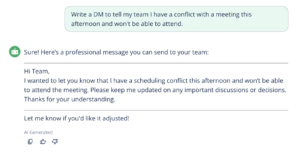
To get the best possible outputs from this tool, be sure to provide as much context as possible in your prompt. If you’re not happy with the output, you can also provide feedback to revise your message until it meets your needs.
- Tell my boss my kid’s sick so I’ll be working from home.
- Revise this feedback to make it more gentle and professional: “This draft is kind of all over the place and I can’t understand it. You need to make some major edits.”
- A polite reminder to a colleague to submit their invoice.
- Ask my manager if I can take next Friday off.
- Follow up on a message I sent last week about rescheduling our meeting.
- Thank a teammate for jumping in to help on short notice—keep it casual but sincere
Frequently asked questions about writing Slack messages
- How should I start a Slack message?
-
Aim to keep Slack messages friendly and to the point.
It’s usually best to start with a greeting and make it clear who you’re addressing (especially if multiple people will receive your message). For example, you could write “Hi Team” or “@Sam.”
Next, briefly state the purpose of your message. If you’re asking for something, be clear but polite.
If you find yourself spending a lot of time trying to write the perfect message, QuillBot’s free AI Slack message generator is a great way to capture the nuance you want without wasting precious time.
- How long should a Slack message be?
-
Keep your message as short as possible while still being clear. Aim for a few concise sentences or a short paragraph. If your message is long, use line breaks or bullet points for readability.
To avoid formatting issues or truncation, Slack generally recommends limiting your messages to 4,000 characters. However, if you find yourself writing a very long message, consider using email or sharing a document instead.
Need help distilling your message down to its key points? Try QuillBot’s free AI Slack message generator—your coworkers will appreciate the clarity!
- Can I use AI to write Slack messages?
-
Yes! Tools like QuillBot’s free AI Slack message generator can help you write or refine Slack messages by suggesting clear, professional wording and helping you strike the right tone—especially in high-pressure or sensitive situations.
Cite this QuillBot article
We encourage the use of reliable sources in all types of writing. You can copy and paste the citation or click the "Cite this article" button to automatically add it to our free Citation Generator.
QuillBot. (2025, July 21). How to Write Slack Messages With AI | Tips & Tools. Quillbot. Retrieved April 10, 2026, from https://quill.cosmictools.in/blog/ai-writing-tools/how-to-write-slack-messages-with-ai/