If you’ve ever tried to upload a photo to a website or send it to a Windows user only to encounter a “file not supported” error, you’ve likely encountered the HEIC image format. Many Apple products use High Efficiency Image Container (HEIC) files to save space when storing high-quality images, but formats like JPEG and PNG are more universally compatible.
Thankfully, converting your HEIC and HEIF images to a different format is fast and easy with QuillBot’s free HEIC image converter. Read on to learn more about how to convert and share your images with the click of a button.
Published on
February 18, 2026
by
QuillBot.
Revised on
March 8, 2026
YouTube thumbnails aren’t just tiny pictures. They’re click magnets. The right thumbnail can make a difference between a video that goes viral and one that gets lost in the feed. Videos with custom thumbnails consistently achieve higher click-through rates (CTR) than auto-generated video stills, which don’t always convey the video’s story.
But not everyone is a professional designer. How can you create thumbnails that stand out, drive clicks, and maintain consistent brand identity without design skills? That’s where an AI thumbnail generator comes in. QuillBot’s YouTube thumbnail maker combines design expertise and psychology to produce high-performing thumbnails, and it’s completely free to use.
Keep reading to discover what you can achieve with a YouTube thumbnail generator and why AI-generated thumbnails get more clicks.
You’re grading assignments when a student submits digital artwork that gives you pause. It’s impressive, but unlike anything they’ve submitted before. In a different situation, you’re scrolling through social media and see photos from what looks like an exclusive event, yet something doesn’t quite add up. Or you’re following breaking news and can’t shake the feeling that the dramatic images being shared might not be real.
In everyday situations like these, deciding what’s real isn’t always straightforward. As AI-generated images become harder to spot with the naked eye, AI image detectors are quickly becoming part of basic digital hygiene—simple checks that help people question images thoughtfully instead of taking them at face value.
Pro tipUse QuillBot’s free AI image detector to upload an image and see a quick percentage of how likely it is to be AI-generated.
Published on
February 18, 2026
by
QuillBot.
Revised on
April 7, 2026
Technically speaking, complementary colors aren’t colors that necessarily look good together; they’re colors that are opposite each other on a color wheel. They contrast strongly and “neutralize” each other if mixed, shifting toward dull grays or browns if you’re using paints or toward colorless grays or white if the colors are produced with light (e.g., on a computer display).
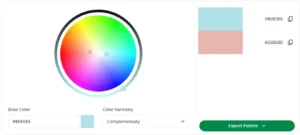
You can find complementary colors using an online tool like QuillBot’s free color wheel—all you need to do is enter a hex code (e.g., #B0E0E6 for a pastel blue) and select “Complementary” from the color harmony drop-down menu.
Published on
February 16, 2026
by
QuillBot.
Revised on
April 7, 2026
So you’ve found a color that encapsulates your brand—perhaps it’s a fresh green to hint at sustainability, a deep blue to evoke trust, or a refined teal to help you stand out from the crowd.
A color wheel tool, like QuillBot’s free color wheel, can help you expand on that signature color to build a palette you can use consistently across your website, social posts, flyers, and other brand materials.
This article will show you a simple method for generating a five-color palette you can use as a foundation for your project’s branding design, using a color wheel and some basic color theory.
As AI-generated images become increasingly realistic, knowing how to spot them has become an essential skill for anyone navigating digital content.
Below, you will find simple ways to spot AI-generated images and learn how online tools like QuillBot’s AI image detector can help you detect AI images when visual clues aren’t enough.
Published on
February 11, 2026
by
QuillBot.
Revised on
March 8, 2026
Thumbnails are often the first thing viewers notice when browsing content online. Many platforms can automatically generate a thumbnail for you, but sometimes you want a custom thumbnail to better convey your message, showcase your brand, or make your content stand out.
An AI thumbnail generator lets you quickly create unique, visually engaging thumbnails without expensive software or special design skills. With QuillBot’s free AI thumbnail generator, you can experiment with different art styles, color schemes, and layouts to match your content and brand.
This guide walks you through the step-by-step process for creating custom thumbnails that are professional, clickable, and eye-catching, even if you’re new to design.
Storyboards are an essential tool to create a visual bridge between your raw script and the finished visual product. Whether you’re a filmmaker, marketer, or content creator, a storyboard acts as your blueprint. A great one can reduce confusion and enhance collaboration as you tackle your next project.
If you’re not a graphic designer or are tight on time or money, tools like QuillBot’s AI storyboard generator are a great way to streamline the process.
Published on
January 28, 2026
by
QuillBot.
Revised on
March 8, 2026
Creating professional-looking visuals used to require a steep learning curve and hard-to-use tools. But today, whether you’re looking to create a bespoke website, customize merch for an upcoming event, or wow your audience with a stunning presentation, there’s a solution out there to help you realize your vision.
With QuillBot’s AI design generator, creating your own visuals is now as fast as typing a prompt. In this guide, we’ll show you how to move past the basics and use AI to generate beautiful, professional designs.
Published on
January 28, 2026
by
QuillBot.
Revised on
April 7, 2026
Choosing the right colors for a project can be tricky—whether you’re designing a brand or website, decorating a room, or planning an event. Color palette generators, like QuillBot’s free AI-powered color palette generator, can help by analyzing an image or photo containing color combinations you like and extracting a balanced four-color palette based on its key tones. In the examples below, you’ll discover how a color palette generator can help you create cohesive color schemes for your projects.
If you don’t already have an image to work with, use QuillBot’s ai image generator to quickly create visuals that match your project’s style before extracting a color palette.